Health Checks
Background health checks continuously probe every worker, take unhealthy workers out of the selection pool without waiting for requests to fail, and return them when they recover.
Overview
Proactive Monitoring
Detect worker failures before they impact requests—not after.
Automatic Isolation
Unhealthy workers stop receiving traffic without manual intervention.
Self-Healing
Workers rejoin the pool when they recover, including after a restart on the same address.
Configurable Sensitivity
Tune detection speed vs. tolerance for temporary issues, globally or per worker.
Why Health Checks?
Without proactive health checks:
- Reactive detection: Failures only discovered when real requests fail
- Wasted requests: Multiple requests may fail before worker is marked unhealthy
- Slower recovery: No way to know when a worker has recovered without trying it
With health checks:
- Proactive detection: Unhealthy workers leave the pool without waiting for requests to fail
- Fast recovery: Workers rejoin the pool as soon as they're healthy
- Fewer wasted requests: Real requests only go to verified healthy workers
How It Works
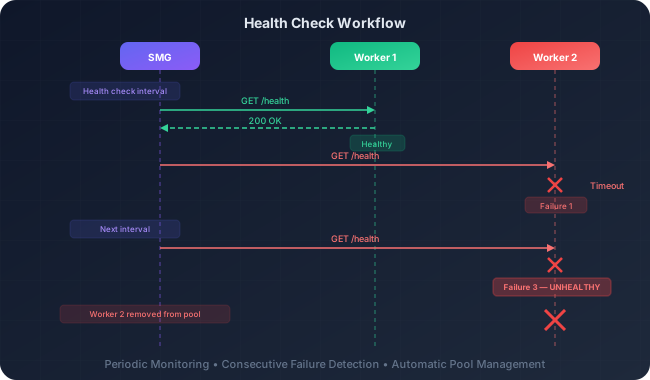
SMG probes each registered worker on its own schedule. A newly registered worker is probed immediately, then once every --health-check-interval-secs. Probes run concurrently, up to 128 at a time, so a slow worker does not delay the others.
Probes by Worker Type
| Worker | Probe | Healthy when |
|---|---|---|
| HTTP | GET on the worker URL plus --health-check-endpoint (default /health), sending the worker's API key as a bearer token when one is configured |
The response is 2xx within --health-check-timeout-secs |
| gRPC | The engine's HealthCheck RPC; --health-check-endpoint does not apply |
The engine reports healthy within --health-check-timeout-secs |
ZMQ (ipc://) |
A local check of the engine connection; nothing is sent to the engine | The engine's handshake has completed and its connection is still alive |
| External providers (OpenAI, Anthropic, and others) | Not probed unless the worker spec sets health.disable_health_check: false |
— |
The ZMQ probe is also what reconnects a restarted engine, so health checks stay on for ZMQ workers even when they are disabled in configuration. Under --upstream-http2, HTTP probes use the same protocol as request traffic: HTTP/2 for workers that negotiated it at registration, HTTP/1.1 for the rest (see Request Streaming).
The HTTP probe sends the API key in the Authorization header, as regular-mode HTTP requests do, so on a plain http:// worker URL the key crosses the network unencrypted.
Worker States
| State | Meaning | Traffic |
|---|---|---|
| Pending | Freshly registered, not yet verified | No requests |
| Ready | Passing health checks | Receives requests |
| NotReady | Consecutive probe failures reached the readiness threshold | No requests; still probed |
| Failed | Failures continued to the liveness threshold, or Pending ran out of probe attempts |
No requests; removed when auto-recovery is on, otherwise still probed |
| Draining | A Ready worker being removed (by service discovery or the worker API) |
No new requests; not probed |
HTTP and gRPC workers become Ready as soon as their registration completes, because registration has already reached the worker. ZMQ workers stay Pending until the engine completes its handshake, then become Ready immediately.
The smg_worker_health gauge collapses these to 1 (Ready) and 0 (anything else), so existing dashboards continue to work.
State Transitions
| Transition | Condition | At the defaults |
|---|---|---|
| Pending → Ready | --health-success-threshold consecutive successful probes, if registration or the ZMQ handshake has not already made the worker Ready (see above) |
2 probes |
| Pending → Failed | 10 × --health-failure-threshold probes without reaching the success threshold (keeps misconfigured URLs from lingering) |
30 probes |
| Ready → NotReady | --health-failure-threshold consecutive failed probes |
3 probes |
| NotReady → Ready | --health-success-threshold consecutive successful probes |
2 probes |
| NotReady → Failed | 3 × --health-failure-threshold further consecutive failed probes (the liveness threshold, analogous to a Kubernetes liveness probe) |
9 probes |
| Failed → Ready | --health-success-threshold consecutive successful probes, if the worker was not removed |
2 probes |
The failure count restarts when a worker enters NotReady, so a Ready worker that stops answering reaches Failed after 4 × --health-failure-threshold consecutive failed probes: 12 probes, about 12 minutes at the default 60-second interval.
Failed is not terminal. A failed worker that is not removed keeps being probed, so an engine that restarts on the same address rejoins without being registered again.
Worker Auto-Recovery
--remove-unhealthy-workers (alias --worker-auto-recovery) decides what happens to a worker that reaches Failed:
| Setting | Failed worker | How it comes back |
|---|---|---|
| On | Removed from the registry right away (it is not Ready, so there is no drain window) |
Service discovery registers it again while its pod is still Ready, and registration waits for the engine to answer |
| Off | Stays registered and out of rotation, and keeps being probed | Rejoins in place after --health-success-threshold consecutive successful probes |
The default follows --service-discovery. With discovery on, removal is followed by re-registration, so recovery completes on its own. Without discovery, nothing would add a removed worker back, so the default keeps failed workers in place instead of permanently shrinking a static fleet.
| Command | Auto-recovery |
|---|---|
smg launch --service-discovery ... |
On |
smg launch --worker-urls ... |
Off |
smg launch --worker-urls ... --remove-unhealthy-workers |
On (bare flag) |
smg launch --service-discovery ... --no-remove-unhealthy-workers |
Off |
smg launch (the Python launcher from pip, and the container image) also accepts the alias, as --worker-auto-recovery and --no-worker-auto-recovery. The smg binary has no --no- form; turn auto-recovery off there with --remove-unhealthy-workers=false.
Removal targets are resolved from registered worker URLs and pinned to the failed worker's own revision, so only that registration is removed: sibling DP ranks behind the same address stay registered. Workers imported from mesh peers are never removed locally; the gateway that owns them manages them.
Configuration
smg \
  --worker-urls http://w1:8000 http://w2:8000 \
  --health-check-interval-secs 60 \
  --health-failure-threshold 3 \
  --health-success-threshold 2 \
  --health-check-timeout-secs 5 \
--health-check-endpoint /healthParameters
| Parameter | Default | Description |
|---|---|---|
--health-check-interval-secs |
60 |
Interval between probes of each worker |
--health-failure-threshold |
3 |
Consecutive failures before a Ready worker becomes NotReady; also scales the liveness threshold (3×) and the Pending probe cap (10×) |
--health-success-threshold |
2 |
Consecutive successes before a worker returns to Ready |
--health-check-timeout-secs |
5 |
Timeout for each probe |
--health-check-endpoint |
/health |
HTTP path probed on HTTP workers |
--disable-health-check |
false |
Disable background probing (ZMQ workers keep their local check) |
--remove-unhealthy-workers |
follows --service-discovery |
Remove workers that reach Failed (alias --worker-auto-recovery); see Worker Auto-Recovery |
--drain-settle-secs |
5 |
Seconds a Ready worker stays Draining before removal; 0 removes immediately. Not accepted by the Python launcher yet |
Per-Worker Overrides
Workers registered through the worker API can override the gateway defaults in a health block of the worker spec; unset fields keep the gateway values. The same block can be changed later with PATCH /workers/{worker_id}.
{
  "url": "http://worker-3:8000",
  "health": {
    "check_interval_secs": 15,
    "timeout_secs": 3,
    "failure_threshold": 5,
    "success_threshold": 1,
    "drain_settle_secs": 30
  }
}| Field | Overrides |
|---|---|
check_interval_secs |
--health-check-interval-secs |
timeout_secs |
--health-check-timeout-secs |
failure_threshold |
--health-failure-threshold |
success_threshold |
--health-success-threshold |
disable_health_check |
--disable-health-check (ignored when a ZMQ worker registers) |
drain_settle_secs |
--drain-settle-secs |
The probe endpoint and the auto-recovery setting apply gateway-wide. Workers created by service discovery use the gateway defaults.
Recommended Configurations
Fast Detection
Sensitive to failures—detect issues quickly.
smg \
  --health-check-interval-secs 10 \
  --health-failure-threshold 2 \
  --health-check-timeout-secs 3
Use when: Critical availability, rapid failure response needed
Conservative Detection
Tolerant of network blips.
smg \
  --health-check-interval-secs 120 \
  --health-failure-threshold 5 \
  --health-success-threshold 3
Use when: Flaky networks, workers with occasional slow responses
Production Balanced
Balanced detection for typical deployments.
smg \
  --health-check-interval-secs 30 \
  --health-failure-threshold 3 \
  --health-success-threshold 2 \
  --health-check-timeout-secs 5
Use when: Standard production environments
✗ No Health Checks
Disable health checks entirely.
smg --disable-health-checkUse when: External health monitoring, testing scenarios
Worker Health Endpoint
SMG expects HTTP workers to provide a health endpoint that returns:
- 2xx status code: Worker is healthy
- Any other status or timeout: Worker is unhealthy
Example Health Endpoint (vLLM)
vLLM workers expose /health by default:
# vLLM automatically provides /health endpoint
vllm serve meta-llama/Llama-3.1-8B-Instruct --port 8000
Example Health Endpoint (SGLang)
SGLang workers expose /health by default:
# SGLang automatically provides /health endpoint
python -m sglang.launch_server --model-path meta-llama/Llama-3.1-8B-Instruct --port 8000
Custom Health Endpoint
If your worker uses a different health endpoint:
smg \
  --worker-urls http://worker:8000 \
  --health-check-endpoint /api/health
Gateway Probe Endpoints
The probes above are how SMG checks its workers. For Kubernetes, load balancers, and uptime monitors, SMG answers its own probes:
| Endpoint | Response |
|---|---|
/liveness |
200 OK while the process runs, including during shutdown |
/health |
Same as /liveness |
/readiness |
200 with {"status":"ready","healthy_workers":N,"total_workers":M} when SMG can serve traffic, otherwise 503 with a reason |
/readiness returns 503 with one of these reasons:
reason |
Meaning |
|---|---|
insufficient healthy workers |
No Ready worker. In PD mode, no Ready prefill or no Ready decode worker; EPD mode also needs a Ready encode worker |
tokenizer not yet registered |
A Ready gRPC or ZMQ worker's tokenizer is not registered: it is still loading, or loading failed (skipped with --disable-tokenizer-autoload) |
draining |
Graceful shutdown has started |
The readiness decision is recomputed from worker registry events (and at least once per second) and served from memory, so probes answer in constant time regardless of fleet size. Probe responses, including the expected 503s, are logged at DEBUG level, so polling does not flood the log with errors.
Set --health-check-port <port> to also serve /liveness, /readiness, and /health on a dedicated plain-HTTP listener with its own runtime thread, so a saturated gateway cannot starve its probes. The routes stay available on the main port. See Dedicated Probe Port for a Kubernetes example.
Interaction with Circuit Breakers
Health checks and circuit breakers are independent gates, and a worker is selected only when both allow it:
| Gate | Driven by | Excludes a worker when |
|---|---|---|
| Health check | Background probes | Its state is anything other than Ready |
| Circuit breaker | Real request outcomes | Its circuit is open (closed and half-open circuits allow requests) |
Key differences:
- Health checks: Proactive background monitoring (no request impact)
- Circuit breakers: Reactive detection based on real request failures
Both are recommended for production deployments. The hash-based policies (consistent_hashing and prefix_hash) also skip a worker whose circuit breaker is open, because the router removes unavailable workers before the policy runs.
Monitoring
Metrics
| Metric | Labels | Description |
|---|---|---|
smg_worker_health_checks_total |
worker_type, result |
Probe results; result is success or failure |
smg_worker_health |
worker |
1 when the worker is Ready, 0 otherwise, and -1 once the worker has been removed |
Useful PromQL Queries
Health Status
# Current health status per worker
smg_worker_health

# Count of unhealthy workers
count(smg_worker_health == 0)
Check Results
# Health check success rate
rate(smg_worker_health_checks_total{result="success"}[5m]) /
rate(smg_worker_health_checks_total[5m])

# Failed checks per minute
rate(smg_worker_health_checks_total{result="failure"}[1m]) * 60
Alert Thresholds
| Metric | Warning | Critical | Action |
|---|---|---|---|
| Unhealthy workers | 1 worker | >50% workers | Investigate worker health |
| Health check success rate | <90% | <70% | Check network connectivity |
Alerting Example
groups:
  - name: smg-health-checks
    rules:
      - alert: WorkerUnhealthy
        expr: smg_worker_health == 0
        for: 5m
        labels:
          severity: warning
        annotations:
          summary: "Worker {{ $labels.worker }} is unhealthy"

      - alert: MajorityUnhealthy
        # Removed workers report -1, so count only registered ones
        expr: count(smg_worker_health == 0) > count(smg_worker_health >= 0) / 2
        for: 1m
        labels:
          severity: critical
        annotations:
          summary: "Majority of workers are unhealthy"
Tuning Guidelines
| Symptom | Potential Adjustment |
|---|---|
| Workers marked unhealthy too quickly | Increase --health-failure-threshold |
| Slow failure detection | Decrease --health-check-interval-secs |
| Health checks timing out | Increase --health-check-timeout-secs |
| Workers slow to rejoin | Decrease --health-success-threshold |
| Too many health check requests | Increase --health-check-interval-secs |
| Workers vanish for good after an outage in a static fleet | Turn auto-recovery off (--remove-unhealthy-workers=false; Python launcher: --no-remove-unhealthy-workers) so failed workers rejoin in place |
Removed workers stay Draining too long |
Decrease --drain-settle-secs |